


ヒートマップ風タグクラウドを使っていくと、
「各タグの背景色を自由に設定できるようにしたい」
といった要求が出てきます。
そこでその機能を追加することにしました。
しかし、それを前回コードを併用して機能させると、将来のアップグレードなどで、思わぬ影響が出でるかしれません。
そこで本記事では、前回コードとは別のコードとして実装する方法にしました。
これにより、同じブログ内で両方設置できて比較でき、どちらが自身のブログに合うか確認もできます。
好みの色で表示してみてください。
前回記事
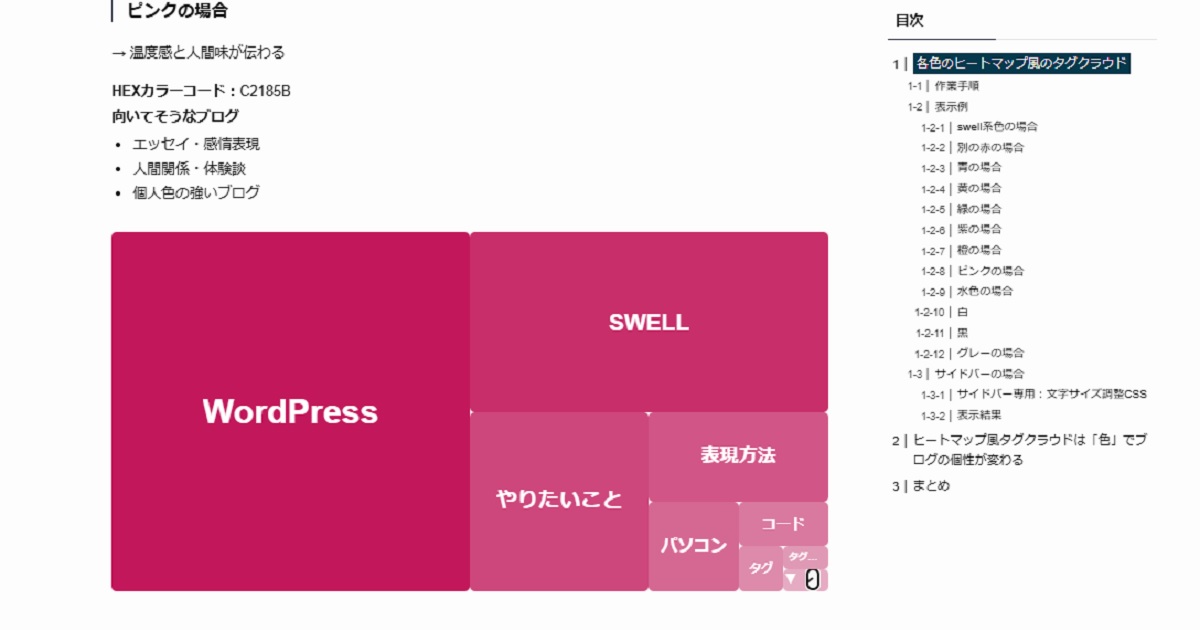
今回のコードも、AIで作成したもので、環境によっては機能しないかもしれません。そのため、コードを追加する場合は注意してください。
念のためにバックアップを推奨します。
仕様
今回のコードは、下記の仕様を満たします。前回とは別の新規ショートコードですが、4以外は同じです。
また前回版は、共存させるならそのままにして、不要なら削除してもよいです。
- 1〜8位:通常タグ表示
- 9位:▼のみ表示(クリックで展開)
- ドロップダウン:9位以降を一覧表示
- 1〜9位の背景色を自由指定(HEX / rgba 対応)
- 標準マーカー(いわゆる「レ」)は右に表示される
手順
新規PHPコード
以下は前回コードとは別の新規です。
functions.php に追記してください。
// 任意カラー対応ヒートマップ風タグクラウド(9色自由指定版 / 9位=▼で展開 / dropdownに9位も含む)
function custom_tag_cloud_boxed_color9_shortcode($atts) {

    // rgba() も許可する簡易サニタイズ
    $sanitize_color = function($val) {
        $val = trim((string)$val);
        if ($val === '') return '';

        // HEX (#rrggbb) を許可
        $hex = sanitize_hex_color($val);
        if ($hex) return $hex;

        // rgba(r,g,b,a) を許可(0-255, 0-1)
        if (preg_match('/^rgba\(\s*(\d{1,3})\s*,\s*(\d{1,3})\s*,\s*(\d{1,3})\s*,\s*(0|0?\.\d+|1(\.0)?)\s*\)$/', $val, $m)) {
            $r = (int)$m[1]; $g = (int)$m[2]; $b = (int)$m[3];
            if ($r <= 255 && $g <= 255 && $b <= 255) return $val;
        }

        return '';
    };

    $atts = shortcode_atts( array(
        'number' => 30,
        'color'  => '#ff0000', // ベース色(c1〜c9未指定の順位はこれ+opacityで自動生成)

        // ★ 1〜9位の色を自由指定(未指定ならベース色+opacity)
        'c1' => '',
        'c2' => '',
        'c3' => '',
        'c4' => '',
        'c5' => '',
        'c6' => '',
        'c7' => '',
        'c8' => '',
        'c9' => '',
    ), $atts, 'custom_tag_cloud_boxed_color9' );

    // ベース色確定
    $base_color = sanitize_hex_color($atts['color']);
    if ( ! $base_color ) $base_color = '#ff0000';

    // HEX → RGB(自動生成用)
    list($br, $bg, $bb) = sscanf($base_color, "#%02x%02x%02x");

    // タグ取得(投稿数順)
    $tags = get_tags( array(
        'orderby'    => 'count',
        'order'      => 'DESC',
        'number'     => (int)$atts['number'],
        'hide_empty' => true,
    ) );
    if ( empty($tags) ) return '';

    // ★ dropdownに入れるのは「9位以降」(= index 8 以降)
    $rest_tags = array_slice($tags, 8);

    // Ver.1.0 opacity(未指定の順位はこれで自動生成)
    $opacity_map = [1.00, 0.90, 0.79, 0.72, 0.64, 0.57, 0.49, 0.42, 0.34];

    // 順位ごとの色(指定があればそれ優先)
    $custom_colors = array(
        1 => $sanitize_color($atts['c1']),
        2 => $sanitize_color($atts['c2']),
        3 => $sanitize_color($atts['c3']),
        4 => $sanitize_color($atts['c4']),
        5 => $sanitize_color($atts['c5']),
        6 => $sanitize_color($atts['c6']),
        7 => $sanitize_color($atts['c7']),
        8 => $sanitize_color($atts['c8']),
        9 => $sanitize_color($atts['c9']),
    );

    $html = '<div class="custom-tag-boxed-heatmap-color custom-tag-boxed-heatmap-color9">';

    foreach ( $tags as $i => $tag ) {
        $rank = $i + 1;
        if ( $rank > 9 ) break;

        // 背景色(cNがあればそれ、なければベース色+opacity)
        if ( ! empty($custom_colors[$rank]) ) {
            $bg_color = $custom_colors[$rank];
        } else {
            $opacity  = $opacity_map[$rank - 1];
            $bg_color = "rgba({$br}, {$bg}, {$bb}, " . round($opacity, 2) . ")";
        }

        // フォントサイズ(既存仕様そのまま)
        if ($rank === 1) {
            $font_size = 48;
        } elseif ($rank === 2) {
            $font_size = 26;
        } else {
            $font_size = 24 - (($rank - 3) / 6) * 16;
        }

        // ★ 9位は「▼」でクリック展開
        if ($rank === 9) {
            $html .= '<details class="tag-box-color tag-9 tag-etc"
                style="background-color:' . esc_attr($bg_color) . '; font-size:' . esc_attr(round($font_size, 2)) . 'px;">';

            $html .= '<summary class="tag-etc-summary"><span class="tag-etc-arrow">▼</span></summary>';

            if ( ! empty($rest_tags) ) {
                $html .= '<div class="tag-etc-panel">
                    <select class="tag-etc-dropdown"
                        onchange="if(this.value){window.location.href=this.value;}"
                        aria-label="その他のタグ">
                        <option value="">タグを選択</option>';

                foreach ($rest_tags as $t) {
                    $html .= '<option value="' . esc_url(get_tag_link($t->term_id)) . '">'
                          . esc_html($t->name) . ' (' . intval($t->count) . ')
                          </option>';
                }

                $html .= '</select></div>';
            }

            $html .= '</details>';
            continue;
        }

        // 1〜8位は通常タグ表示
        $html .= '<a href="' . esc_url(get_tag_link($tag->term_id)) . '"
            class="tag-box-color tag-' . $rank . '"
            style="background-color:' . esc_attr($bg_color) . ';
                   font-size:' . esc_attr(round($font_size, 2)) . 'px;"
            title="' . esc_attr($tag->count) . ' 件の投稿">
            <span>' . esc_html($tag->name) . '</span>
        </a>';
    }

    $html .= '</div>';
    return $html;
}
add_shortcode('custom_tag_cloud_boxed_color9', 'custom_tag_cloud_boxed_color9_shortcode');新規CSSコード
/* ================================
   任意カラー対応ヒートマップ(9色自由指定版)
   shortcode: [custom_tag_cloud_boxed_color9]
================================ */

/* 外枠:レスポンシブ(最大840px) */
.custom-tag-boxed-heatmap-color9{
  position: relative;
  width: 100%;
  max-width: 840px;
  aspect-ratio: 2 / 1;  /* 840:420 */
  height: auto;
  box-sizing: border-box;
  overflow: hidden;
  background: #f7f7f7;
}

/* タグ共通 */
.custom-tag-boxed-heatmap-color9 .tag-box-color{
  position: absolute;
  display: flex;
  align-items: center;
  justify-content: center;

  color: #fff;
  font-weight: bold;
  text-decoration: none;
  overflow: hidden;
  border-radius: 6px;
  padding: 0 6px;
  box-sizing: border-box;
  white-space: nowrap;
  text-overflow: ellipsis;

  transition: transform 0.2s, box-shadow 0.2s;
}

.custom-tag-boxed-heatmap-color9 .tag-box-color:hover{
  transform: scale(1.05);
  box-shadow: 0 2px 6px rgba(0,0,0,0.3);
}

.custom-tag-boxed-heatmap-color9 .tag-box-color span{
  max-width: 100%;
  overflow: hidden;
  text-overflow: ellipsis;
  white-space: nowrap;
}

/* =================================
  9色自由指定版 配置(840×420→%)
================================= */

/* 1位:420×420 -> 幅50% 高さ100% */
.custom-tag-boxed-heatmap-color9 .tag-1 { left:0%;    top:0%;    width:50%;    height:100%; }
/* 2位:420×210 -> 幅50% 高さ50% */
.custom-tag-boxed-heatmap-color9 .tag-2 { left:50%;   top:0%;    width:50%;    height:50%; }
/* 3位:210×210 -> 幅25% 高さ50% */
.custom-tag-boxed-heatmap-color9 .tag-3 { left:50%;   top:50%;   width:25%;    height:50%; }
/* 4位:210×105 -> 幅25% 高さ25% */
.custom-tag-boxed-heatmap-color9 .tag-4 { left:75%;   top:50%;   width:25%;    height:25%; }
/* 5位:105×105 -> 幅12.5% 高さ25% */
.custom-tag-boxed-heatmap-color9 .tag-5 { left:75%;   top:75%;   width:12.5%;  height:25%; }
/* 6位:105×52.5 -> 幅12.5% 高さ12.5% */
.custom-tag-boxed-heatmap-color9 .tag-6 { left:87.5%; top:75%;   width:12.5%;  height:12.5%; }
/* 7位:52.5×52.5 -> 幅6.25% 高さ12.5% */
.custom-tag-boxed-heatmap-color9 .tag-7 { left:87.5%; top:87.5%; width:6.25%;  height:12.5%; }
/* 8位:52.5×26.25 -> 幅6.25% 高さ6.25% */
.custom-tag-boxed-heatmap-color9 .tag-8 { left:93.75%;top:87.5%; width:6.25%;  height:6.25%; }
/* 9位:52.5×26.25 -> 幅6.25% 高さ6.25% */
.custom-tag-boxed-heatmap-color9 .tag-9 { left:93.75%;top:93.75%;width:6.25%;  height:6.25%; }


/* ==========================================
  スマホ・タブレット文字サイズ調整
========================================== */

@media screen and (max-width: 767px) {

  /* ① %の基準を固定 */
  .custom-tag-boxed-heatmap-color9 {
    font-size: 16px;
  }

  /* ② 全体縮小 */
  .custom-tag-boxed-heatmap-color9 .tag-box-color {
    font-size: 60% !important;
  }

  /* ③ 1位を強調 */
  .custom-tag-boxed-heatmap-color9 .tag-1 {
    font-size: 120% !important;
  }

  .custom-tag-boxed-heatmap-color9 .tag-1 span {
    font-size: inherit !important;
  }

  /* ④ 2位 */
  .custom-tag-boxed-heatmap-color9 .tag-2 {
    font-size: 70% !important;
  }

  .custom-tag-boxed-heatmap-color9 .tag-2 span {
    font-size: inherit !important;
  }
}

/* ==========================================
   白系(#EEEEEE)専用処理
   ・枠線ON
   ・文字を黒
   (CSSのみ/PHP不要)
========================================== */

/* 1) rgba(238,238,238,*) のとき(旧方式) */
.custom-tag-boxed-heatmap-color9
.tag-box-color[style*="rgba(238, 238, 238"]{
  border: 1px solid #04384D70;
  color: #04384C !important;
}

/* 2) #EEEEEE が style に入るとき(今回の自由指定で起こりやすい) */
.custom-tag-boxed-heatmap-color9
.tag-box-color[style*="#EEEEEE"],
.custom-tag-boxed-heatmap-color9
.tag-box-color[style*="#eeeeee"],
.custom-tag-boxed-heatmap-color9
.tag-box-color[style*="#EEE"],
.custom-tag-boxed-heatmap-color9
.tag-box-color[style*="#eee"]{
  border: 1px solid #04384D70;
  color: #04384C !important;
}

/* ▼(9位)の矢印も黒に */
.custom-tag-boxed-heatmap-color9
.tag-box-color[style*="rgba(238, 238, 238"] .tag-etc-arrow,
.custom-tag-boxed-heatmap-color9
.tag-box-color[style*="#EEEEEE"] .tag-etc-arrow,
.custom-tag-boxed-heatmap-color9
.tag-box-color[style*="#eeeeee"] .tag-etc-arrow,
.custom-tag-boxed-heatmap-color9
.tag-box-color[style*="#EEE"] .tag-etc-arrow,
.custom-tag-boxed-heatmap-color9
.tag-box-color[style*="#eee"] .tag-etc-arrow{
  color: #04384C !important;
}

/* ==========================================
   サイドバー表示用 文字サイズ調整
========================================== */

.l-sidebar .custom-tag-boxed-heatmap-color9 .tag-box-color,
.sidebar .custom-tag-boxed-heatmap-color9 .tag-box-color {
  font-size: 60% !important;
}

.l-sidebar .custom-tag-boxed-heatmap-color9 .tag-1,
.sidebar .custom-tag-boxed-heatmap-color9 .tag-1 {
  font-size: 80% !important;
}

/* ==========================================
  ▼展開:標準detailsマーカー(レ・三角)を消す
========================================== */

.custom-tag-boxed-heatmap-color9 .tag-etc summary::-webkit-details-marker { display:none; }
.custom-tag-boxed-heatmap-color9 .tag-etc summary::marker { content:""; }

.custom-tag-boxed-heatmap-color9 .tag-etc{
  display:flex;
  align-items:center;
  justify-content:center;
  padding:0;
}

.custom-tag-boxed-heatmap-color9 .tag-etc-summary{
  padding:0;
  margin:0;
  width:auto;
  height:auto;
  display:inline-flex;
  align-items:center;
  justify-content:center;
  cursor:pointer;
  list-style:none;
}

.custom-tag-boxed-heatmap-color9 .tag-etc-arrow{
  font-size:14px;
  font-weight:700;
  line-height:1;
}

.custom-tag-boxed-heatmap-color9 .tag-etc-panel{
  padding:8px 10px 10px;
  width:100%;
}

.custom-tag-boxed-heatmap-color9 .tag-etc-dropdown{
  width:100%;
  font-size:13px;
  padding:4px 6px;
  border-radius:6px;
}ショートコードの使い方|9色を自由に指定
一つづつ設定していってください。一部だけ指定して、残りは自動生成に任せることも可能です。
[custom_tag_cloud_boxed_color9
 c1="#0e2e3d" c2="#16435a" c3="#1d5975" c4="#2a6f8e" c5="#3b86a6"
c6="#58a0bd" c7="#7abbd4" c8="#a4d5ea" c9="#0e2e3d"]完成
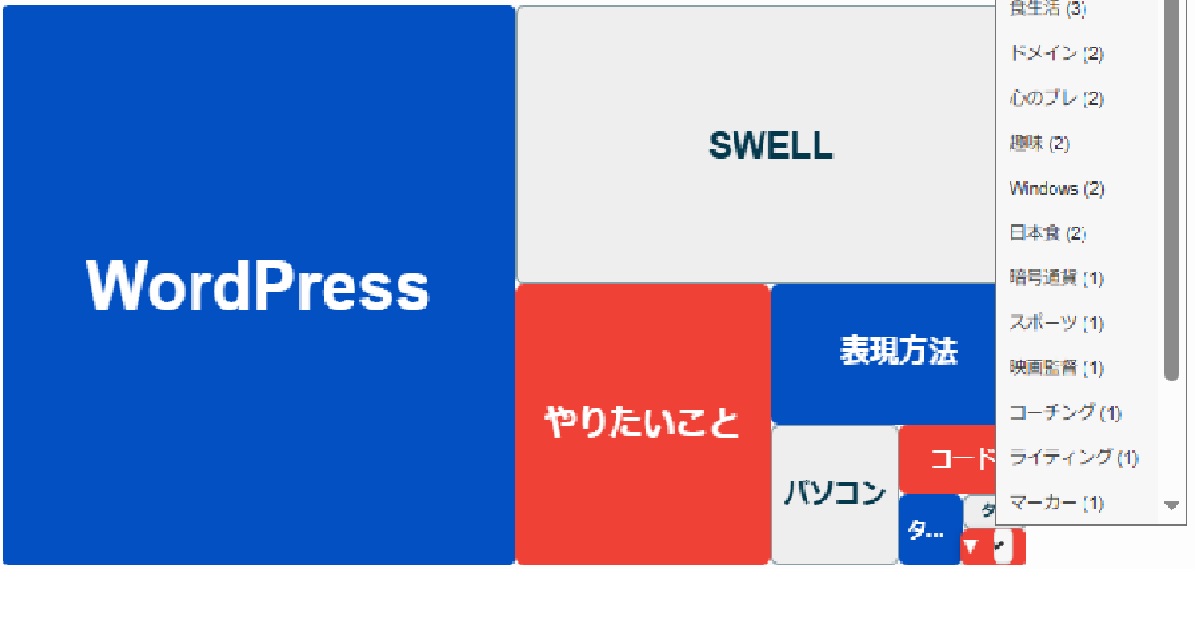
完成表示
これが完成した表示です。
設定なし
設定しない場合は、赤で表示されます。
[custom_tag_cloud_boxed_color9
 c1="#0e2e3d" c2="#16435a" c4="#2a6f8e" c5="#3b86a6" c7="#7abbd4" c9="#0e2e3d"]
一部を設定しない
別パターン
別の配色
[custom_tag_cloud_boxed_color9
 c1="#0350C3" c2="#EEEEEE" c3="#EF4135" c4="#0350C3" c5="#EEEEEE"
 c6="#EF4135" c7="#0350C3" c8="#EEEEEE" c9="#EF4135"]
別の青白赤の配色コード
安全に色を自由に変えられるようにしました
前回作ったヒートマップと見比べるために、同じブログの中で、2つのヒートマップを同時に表示できる形にしています。
そのため、
- 前回とは 別のコード
- 前回とは 別のCSS
- 前回とは 別のショートコード
を使っています。
こうしておけば、
- うまくいかなかったら すぐ元に戻せる
- 前回の表示を 壊してしまう心配がない
- 同じページで 見た目を比べて確認できる
という安心な状態で試すことができます。
今回のやり方は、ブログ全体には影響せず、指定した場所だけに反映されるので、初心者の方でも安心して使える方法です。
まとめ
今回の実装のポイントは、次の3つです。
- 1つ目は、見た目や仕組みが似ていても、別のものとして実装する方が扱いやすいという点です。これにより、試行錯誤や比較がしやすくなります。
- 2つ目は、9位を「▼」のナビにする構成を引き継いだことです。上位タグはひと目で把握でき、下位タグは必要なときに探せるため、可視化と探索のバランスが保たれています。
- 3つ目は、9色を自由に指定できるようになったことで、表現の幅が大きく広がったことです。ブログの雰囲気やテーマに合わせて、色の設計を柔軟に変えられます。
前回のタグクラウドと今回のものを実際に見比べて、使いやすい・しっくりくる方を選んで使ってください。
コメント